Sunday, 31 January 2016

All our Magic IP's are down, so it time to hurn for new Magic IP's. Without long story am going to drop all the new hunted Magic IP's here.


While am busy fishing New Magic IP's, Kindly keep on visiting this page to grab them


New Active Magic IP's

12.34.252.196:8080

158.69.218.72:3128

209.34.18.162:3128

For more details about Magic IP's visit HERE

Am so freaked right now, because this is like one of my best topics (Music), probably is for you guys too. So, am gonna be dropping a list of amazing music Players from the "best to best" because they are pretty much awesome. So here are my most preferred.

SHUTTLE+ MUSIC PLAYER:  

Probably the best-looking music app on Android, Shuttle has a good line-up of features, including a six-band equalizer, and automatic downloads for artwork and lyrics. Shuttle also uses Last.fm scrobbling, which will work out which songs you listen to the most over time, and help tailor playlists to your liking.

If  you splash out US$1.75 / £1.10 for the paid version, you get more themes, folder browsing, and even Chromecast support.


Download Shuttle+ Here

MUSIX MATCH:

Musixmatch offers something a little different. As well as a sleek, elegant interface for listening to your music, it also comes with the FloatingLyrics widget, which syncs lyrics to music that you listen to, and lets you read lyrics as you're listening to songs on your default music player, Spotify, YouTube, and various other music apps.

You can even type lyrics into the widget and it'll find the matching song on your device. It's this unique widget that makes Musixmatch a real winner.


Download MusixMatch Here

JETAUDIO MUSIC PLAYER

This is one of the better music players on Android, mainly because of its strong host of tweaks and effects you can add when listening to your music. Plugins include the AM3D Audio Enhancer and Bongiovi DPS, which enhances sound processing in a way that true audio enthusiasts will appreciate.
Am gonna shared a like of the Plus Version with unlocked features.


Download JetAudio Music Player Here

MIX ZING MUSIC PLAYER

This is an all-round media player that handles video and music with equal aplomb. On the music side of things, it has a feature that recognizes your music – even without tags – and matches it up with artwork and lyrics.

This ensures that there will be few blank spaces or generic musical notes when you're browsing your library and admiring the album covers. There is also Mood Player, which automatically creates playlists based on how you tell the app you're feeling, and when you're online, you get further listening recommendations based on your favorite tunes.


Download Mix Zing Here

POWERAMP PRO MUSIC PLAYER

As one of the most popular music players for Android, Poweramp is a safe bet for your musical needs. Album art and lyrics can be integrated into the player, and it provides an impressive 10-band equalizer to help tweak your sound output. You can even save your EQ presets, allowing you to set up specific ones for specific headphones.

The only downside is that Poweramp displays the directory names of the songs and albums in your library when you are browsing, which looks untidy.
Poweramp has themes galore, so you don't have to stick with the default interface.


Download PowerAmp Cracked Here

n7PLAYER MUSIC PLAYER

This app offers something a little different; a tag cloud, where artists and song names are displayed on your screen, in varying sizes, depending on how much you listen to them. It looks great, and comes with its own EQ with haptic feedback. Creative, with some interesting use of multi-touch, n7player is definitely worth checking out.


Download n7player Premium Here

There are loads of Players out there but this are the best there is..


I know a lot of Infinix Hot 2 users need this right now, and same goes for any other person who doesn't wanna update his/her phone probably because of the bugs rumoured about the pending Update.

Well this is the post you've been waiting for, you have to be rooted in other to Disable automatic system update using this app.


HOW TO USE:
▪ Install and open the app
▪ Navigate to Google play services and open it.
▪ In Google play services untick System Update, see screenshot above.

Download Disable Service Here

  Rooting lollipop devices could be a pain in the ass, but thanks to Team Hovatek its much more simpler and easier, as they have successfully rooted the Gionee P5W via CWM recovery.

  So without wasting much time:
▪ Install VCOM drivers on your PC using https://forum.hovatek.com/thread-440.html

▪ Download SuperSu zip

▪ Copy SuperSU.zip to both the phone’s SD card and internal storage.

▪ Download CWM for Gionee P5W ported by team Hovatek HERE

▪ Switch off the phone (still with battery inside)

▪ Flash the Clockworkmod recovery.img to the phone using SP Flash tool @ https://forum.hovatek.com/thread-159.html

▪ Boot the phone into recovery mode using Volume up button + Power button

▪ In Clockworkmod recovery mode, you use the Volume up button to scroll up, Volume down button to scroll down and Power button to select

▪ Scroll down to select install zip and Click it.

▪ Select choose zip /storage/sdcard1

▪ Navigate to the locate of SuperSU and select it.

▪ Select yes- Install SuperSU to gain root on your device.

▪ After flashing is complete go back and select Reboot.

▪ If CWM offers to fix missing root, pls select No and when your phone is rebooted, You can confirm root by installing root checker apk HERE.

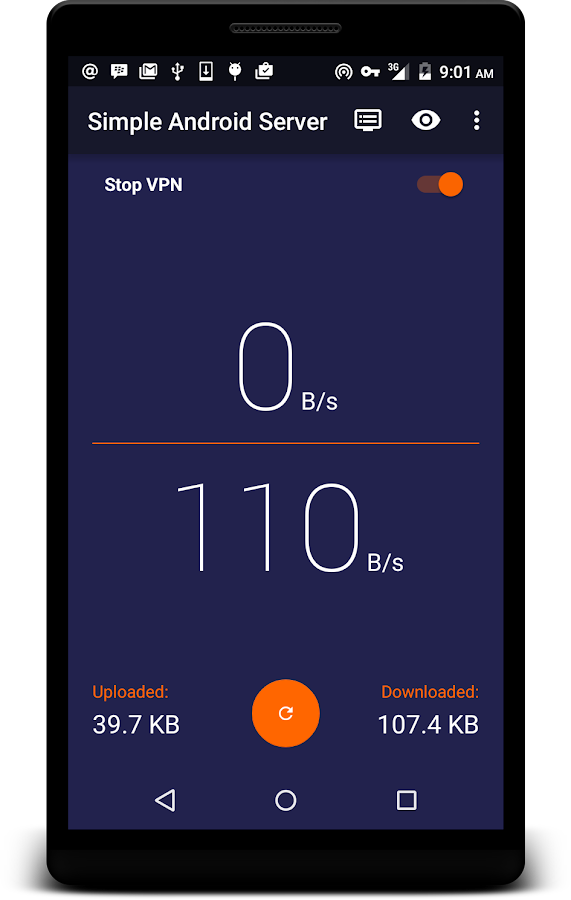
New version of SimpleAndroidServer is now available and it has Free VPN services and Premium VPN service. So we can now enjoy free VPN service without paying anything. Now we have two choice weather to pay or not.


As they said SimpleAndroidServer v4 contains a Proxy Server and a Free VPN. The VPN is not a full featured VPN. it is not provided for security but for tunneling purposes.


Here are some New Features added to SimpleAndroidServer v4


=>VPN Is now free to use

=>Added Auto-start for Local server for premium users

=>If VPN becomes too slow over time, restart the VPN connection.

=> Added Front Query and Back Query feature

=>Fixed Sending of Configuration. Added Load Configuration Feature, Bug fixes.

=> Add host replacement feature


Here are some features that make the difference between Free VPN and Premium VPN


For Premium VPN

=>No ads for the duration of your subscription

=>Stop hourly disconnect of the VPN

=>Auto start on boot for local server

=>Up to 10 concurrent connections for VPN


For Free VPN

=>Plenty of ads available

=>Limited concurrent connections for VPN

Where To Download SimspleAndroidServer V4

Kindly visit HERE to download it from playstore


  Many of us have lost one or a lot of memorable moments probably because our phones got bad and we had to do a factory wipe or our phones got stolen at some point.

  Well, I am a victim or I was a victim until I found Quick Pic Gallery, this is no ordinary gallery app because this app comes with free cloud storage that helps you auto backup your photos on their unlimited CM Cloud drive. All you have to do is log in and  get 1000gb of free online storage.

  And by inviting a friend u get another 1000gb,which totals 2000gb+, this is so cool because you can get as much storage as you want just by Inviting friends to download the app.

Description:

FAST, LIGHTWEIGHT AND MODERN! QuickPic is 90% smaller than other gallery apps, but packs more power than any of them, making it the best alternative Android gallery app for all your beloved photos!
QuickPic's smooth user experience is optimized for large screens and multiple finger gestures, and contains no ads or extra permissions. Colorful themes and a modern design helps you find your pictures in a fast and fun way. View thousands of your photos instantly in a high quality slideshow, and customize the folders you wish to include and exclude for more efficient scanning.

On top of this, Quick pic CM Cloud function offers speedy back up and restoration for photos - your photos are stored on industry leading Amazon servers to help you preserve all your precious memories securely.

Download Quick Pick Gallery Here

Plenty of Magic are now available online, after testing them all i finally choose one of them and named it The Magic IP of The Week. In this page i am going to list all the best Magic IP's according to my ranking, and i will keep on updating the list by removing the week IP's and replace them with strong one.


Before we go further let me show you the screen snap of the settings of the Best Magic IP Of The Week so that you can be able to configure yours.


Magic IP's Ranking List 
NO.1 Magic IP of The Week [104.208.247.38:3128]

IP104.208.247.38
PORT3128
COUNTRYUSA
CONTIDIONMAGIC
HOW LONG IT TAKES TO CONNECT2-10MIN
DISCONNECTING NO
Reliability100%
SPEEDVERY FAST


  A lot of us are starting the have the marshmallow update sent to us, well some of us upgraded manually, in general, the marshmallow update is fast becoming a thing of the past.


  But thats only if we let it, I know we all rooted and also have xposed installed on our phones, which enables us to fully customise and personalise our device without really altering our software.


  Of course am an Hot 2 user, fully rooted and fully xposed, and I have taken the time and pleasure to test out many of the modules that are available out there. So am gonna be dropping links of the must have modules for marshmallow, you can use the comment box to request for any module that u think caught your attention.

1. Gravity Box MM:
This is the ultimate tool that you need for that enhanced features for your hot 2 and other marshmallow devices. It enables you to tweak your:

*Status bar
*Navigation bar
*Power
*Display etc

Download GravityBox MM Here

2. MinMin Guard:
Estimates show that almost everybody hates ads, they can be really annoying, luckily this app also hates ads too and it works for android devices from 4.0+ that has xposed installed. Perfect offline adblocker.

Download MinMin Guard Here

3. Xstana (Nav. And Status Bar Module)
This is a very lovely module, sincerely I got bored of seeing those "shapes" everyday, until I stumble upon xstana,you've gotta install this module. You can also use this module if you don't have a Nav. Bar for your status bar.

Download Xstana Here

  There are a whole lots of Modules out there but I really can't say much on them, so below are the list of Working, Partially working, and Not working Modules for Marshmallow devices (NB: Modules would work on other Android Versions)

Working:
1++ calculator
4G/LTE switcher 1.0
20 MP Superior Auto
ACDisplay
ActivityForceNewTask
AdBlocker
Advanced power menu+
All Notifications Expanded
Always Expandable Notifications
Always Correct
Ambient display mod
Amplify
App settings (pylers build)
AppOpsXposed
Battery Shutdown Manager
BootManager (possibly SIM bugs)
Bright Lockscreen
BubbleUPNP's Audio cast
Burnt Toast
Call Blacklist Pro
Chrome New Tab
Chrome PIE
Clarity
Clean Lockscreen (can't get rid of mic icon tho)
Cool tool
Copy toast
CrappaLinks
Custom share
Desk Clock Alarm
DisableFlagSecure
Disable Fullscreen Keyboard
Disable Instagram Double Tap
Disable Proximity Sensor (crash during 3D youtube videos)
Disable su indicator
DoubleTapToSleep
Enable ambient display xposed (beta v1.2.3)
EnhancedToast
Eye Preserver
FakeGapps
Fake wifi connection
Flat Style Bar Indicators
Flat style colored bars (updated)
Flat Style Keyboard
Flying Android
Fonter
Force Fast Scroll
Force immersive mode
G4 Tweakbox
Gmail attachment size
Gravity Box MM (official)
Greenify (use latest beta, may cause instability)
HideBatteryLowAlert
Hide Carrier Label
Hide Xposed IME
Hijri Clock
HowGiveLolli
Instagram Themer
Intelli3G
Knock Code (updated 1/17)
Lollistat (updated for MM)
LPThemer
LWInRecents
Lockscreen music art remover
Lockscreen Widgets (widget not detected by zooper)
Materialised xposed (working for some)
Maxlock (possible freezing)
Min min guard (possible freezing)
Minimum brightness
Native Clipboard
NetStrength
Network Speed Indicator
Neversleep
Nexus navbarZ
Niwatori
No Lock Home 2
No device check
Nowakelock
NotifyClean
Play Store Changelog
Powernap
Prevent running
ReceiverStop
RecentApp Clear
QuickPic2Gallery
Root cloak
Screen Filter
ScreenOffAnimation
Serajr Blurred System UI (1.1)
Smart network 2
Smooth System Progress Bars 1.5.0
Snapcolors 3.4.12
Snapprefs (new MM update)
Softkeys Fade Mod
Status Bar Download Progress (updated 1/17)
Statusbar Scroll to Top
Swipeback 2
Swype Tweaks
Trusted wifi for smart lock
Tumblr Adaway
Ultimate Dynamic NavBar Pro
Unicon beta (only on permissive)
UnrestrictedGetTasks (1/17)
Unwatch
Ussd inbox
Volume steps+ (Updated)
Volume unlinked
WhatsApp Emoji Replacer 2
WhatsApp Tuner 1.32
WiFi Key View
Xblast
Xcooldroid
XGELs
XGPM
XHangouts (updated)
Xinsta (working with new version)
XKindleMod
XLDrawer
XLed
Xnotifications
Xorware 2G/3G/4G Switcher
Xorware All in One Widgets
Xposed Additions (updated)
Xposed GEL Settings (beta)
Xposed torch (updated 12/29)
Xprivacy
Xstana
XuiMod
XXSID Indicator
YouTube adaway
Zoom for instagram

Partially working:
Awesome popup player (working for some)
Boot manager (working for some)
DirectApkInstall (installs apk but it package installer doesn't appear)
Gesture Navigation
Lockscreen Disabler (ambient display broken)
Moto Checkbox
Native Freezer
Physical Button Music Control
Restore notification ticker on Lollipop (Prevents heads up from working, but doesn't show ticker text)
TabletMetrics
Wanam kit
XBridge
XInternalSD
XTether
XToast (working for some)
Xinstaller (bootloops for some people)

Not Working:
Audio BT
Audio balance
Audio stream music default
Complete Action Plus (no effect)
Dont Swipe
DynamicAlarmIcon
Exchange Security Bypass
Exchange User Agent Fake (1/17)
HandleExtStorage (1/17)
Hideable Nav Bar
iFont
IMEI Changer
Insert Custom Text (installs but no effect)
Lock screen clock mods [LP]
MagnetOff
Mobile radio active fix
Native Clipboard (non functioning)
Native Freezer
PBCM
PinNotif
PlayPermissionsExposed
Playstore link in App info
ScreenshotDelayRemover (no effect)
Shortcut in app info
SIM Number Changer
SwipeUpToSleep (no effect)
Tinted Recent Panels
True Silent Mode
Vibration tuner
Wifi Filter
Wifi Key View (does nothing)
XBatterythemer
Xclip 2.0
Xtended Nav Bar (does not control music)
Xposed Gesture Navigation (installs but no function)
In general, power and audio related modules are not working.

Place your comments if you have questions or requests for Modules links.

Are you looking for a cheapest and beautiful android smart phone than will cover 90% of your needs?You can go for Doogee X6.


DOOGEE X6 Smartphone use MTK6580 Quad Core CPU, 1GB RAM + 8GB ROM with 5.5 Inch 1280*720 HD screen, Android 5.1 OS, promises quite a fast operation speed is quite amazing and impressive.


It has 2.0MP front camera interpolation to 5.0MP for convenient self-capturing, 8.0MP back camera for you to record every single moment clearly.

Doogee X6 has 3G network, GPS, WiFi, Bluetooth, and 3000mAH battery capacity etc.

With all the fantastic features mention above Doogee X6 has a cheapest price so that everybody can have it, Only US $69.99 and is available in Aliexpress

Friday, 29 January 2016

Airtel Blackberry Unlimited, Absolute and Complete plans for BB10

This post contains all the Airtel Blackberry plans for BB10 users on the Airtel Network in Nigeria. You will find all the various airtel blackberry plans for BB10 users which includes Airtel blackberry Monthly, weekly and daily plans. See the full details of the subscription codes and price list below.


SUBSCRIPTION CODES OF THE AIRTEL BLACKBERRY MONTHLY, WEEKLY AND DAILY PLANS FOR BB10 USERS

airtel-blackberry-unlimited-absolute-and-complete-plans-for-bb10

BB10 MONTHLY PLANS
Lite - 250 MB - 1000 Naira - *440*13#
Midi - 500 MB - 1500 Naira - *440*10#
Max - 1.5GB - 3000 Naira - *440*7#

BB10 WEEKLY PLANS
Lite  - 80 MB - 350 Naira - *440*14#
Midi - 130MB - 525 Naira - *440*11#
Max -  350MB - 1050 Naira - *440*8#

BB10 DAILY PLANS
Lite - 10MB - 70 Naira - *440*15#
Midi - 15MB - 100 Naira - *440*12#
Max - 50MB - 200 Naira - *440*9#

HOW TO CHECK YOUR DATA BALANCE

To check the data balance of your Airtel BB10 plan, simply dial *123*9# or text status to 440

NB: Get up to 30% discount on any smartphone of your choice. Click here for Price list  This post contains all the Airtel Blackberry plans for BB10 users on the Airtel Network in Nigeria. You will find all the various airtel blackberry plans for BB10 users which includes Airtel blackberry Monthly, weekly and daily plans. See the full details of the subscription codes and price list below.


SUBSCRIPTION CODES OF THE AIRTEL BLACKBERRY MONTHLY, WEEKLY AND DAILY PLANS FOR BB10 USERS

airtel-blackberry-unlimited-absolute-and-complete-plans-for-bb10

BB10 MONTHLY PLANS
Lite - 250 MB - 1000 Naira - *440*13#
Midi - 500 MB - 1500 Naira - *440*10#
Max - 1.5GB - 3000 Naira - *440*7#

BB10 WEEKLY PLANS
Lite  - 80 MB - 350 Naira - *440*14#
Midi - 130MB - 525 Naira - *440*11#
Max -  350MB - 1050 Naira - *440*8#

BB10 DAILY PLANS
Lite - 10MB - 70 Naira - *440*15#
Midi - 15MB - 100 Naira - *440*12#
Max - 50MB - 200 Naira - *440*9#

HOW TO CHECK YOUR DATA BALANCE

To check the data balance of your Airtel BB10 plan, simply dial *123*9# or text status to 440 - See more at: http://www.inforisticblog.com/2016/01/airtel-blackberry-unlimited-absolute.html#sthash.PnOARARM.dpuf

Learn How To Make Any Android Keyboard Transparent

Here is a quick tip and DIY to easily make your android keyboard transparent for any application that makes use of the keyboard. This tip should be for fun for those who would need it and would be achieved by the use of an app in the play store.
How to make any android keyboard transparent
1. Head over to Google Playstore and search for Hackers Keyboard
2. Just select then install the App.
3. Open your Hackers keyboard then select and tap “Input Methods” then mark Hackers keyboard and tap the settings icon.
4. After selecting settings, choose “Theme and Label settings” then tap Keyboard Themeand select “Transparent Experimental“.
5. You can also play around the interface and modify other options you like. You can then try it by opening an app that could trigger the android keyboard like Whatsapp or any Chat app.
6. Drop down or expand the notification panel and select “Choose Input Method” select “Hacker’s Keyboard. Boom! Your Android’s keyboard is now transparent.
Having difficulties? Simply use the comment section.

All Mtn Bis Settings For Psiphon Handler


Mtn Bis has been working perfectly for sometime now but some people are complaining that they are having issues using their Mtn Bis. Today I will teach several setting on how to Use Mtn Bis with psiphon handler. Psiphon handler is the best Vpn used to power your Mtn Bis because its fast and more reliable than any other Vpn.

Mtn Bis Subscription Codes

1. For Daily sub dial *216*3*1# @ N70

2. For Weekly sub dial *216*3*2# @ N350

3. For Monthly sub dial *216*3*3# @ N1000

 Psiphon Settings

There are different psiphon settings for Mtn Bis. A friend of mine shared it to me on Whatsapp and I tested all the settings and they were working perfectly.
use your default phone settings
The More option in Psiphon settings is contant i.e where the Host address and port i.e 10.199.212.2 and8080 is as shown in the pic below

It would be more of pics and less writing

1. Psiphon settings for Mtn Bis Bblite
 2,. Psiphon settings for Mtn Bis Bblite

 3. Psiphon settings for Mtn Bis Bblite
4. Psiphon settings for Mtn Bis Bblite

5. Psiphon settings for Mtn Bis Bblite
                                            
I am currently using the 5th settings. If you are having any issue with any of the settings, switch another settings. Confirmed and working flawlessly.

6. Psiphon settings for Mtn Bis Bblite (New)

7. Mtn Bblite Bis Settings (New)

Made this post for people having problems using their bblite subscription on Android.
Note: It's capped 5gb 
If you have any problem, you can drop it in the comment box

Thursday, 28 January 2016

Fishing Magic IP's now become as simple as drinking water, A lot of our readers are hunting Magic IP's and shared it with their friends. I am very happy about it because we have fulfill our aims.


Very soon i will write an article on how to hunt Magic IP's from A-Z to those that are new to it so that we can keep on rocking together

Thanks to all our readers that contributed, by sharing their hunt Magic IP's.

Below are some active Magic IP's shared by our Magic IP's hunters

37.128.116.34: 3128

62.210.220.29: 3128

212.129.35.75: 3128

46.246.38.141: 3128

104.208.247.38: 3128

  Based on Popular demand, I decided to personally post this out there for Our Droidgurus lovers, you asked for it, now you've got it, This is the latest, most probably the fastest Magic IP for etisalat 0.0.

  One of the many reasons Droidgurus should be your homepage, we are gonna keep you updated on bundle of goodies this year has got to offer.

  Below is this Latest Magic IP for Etisalat 0.0


62.210.220.29 : 3128


Please visit previous post of etisalat psiphon settings for Etisalat 0.0 enjoy while it lasts.


Pls do not curse because this take up to 10-20mins before it connects.

 Finally the much awaited sure imei is here, this tweak will give u 750mb and 300mb respectively, all u have to do is analyse the following IMEI with IMEI Analyzer. Please note that this IMEI has been confirmed working just tweak and you'll be surely blessed for your work.

 352373058168368 this imei is for mtn 750mb which is gotten on a NEW SIM ONLY, after tweaking send smart to 131 and wait for your response.

Mtn 300mb
Tweak 359757053317082
Send Mifi to 131 an Also on a new sim.

  Please be patient and tweak correctly and it will be given to you.


Happy tweaking.

 Not many of us have heard about Chamelephon, this app is the best thing to changing the imei of that stubborn Android device of yours especially Marshmallows.

Chamelephon is pretty easy to use, its just a one-click process, unlike the engineering mode style we all grew up with. Am not gonna bore you guys with my hype for this app, so download below.


Am also gonna add Imei analyzer, as we cannot successfully tweak and get the correct luhn digit or check digit (last digit) of our IMEIs.
Download Chamelephon and Imei Analyzer below:

Click here To Download Chamelephon

Click Here to Download Imei Analyzer

  I know a lot of you have been praying for this, now you finally have it on your finger tips. This is the Etisalat Social/Chat pack config settings for Open vpn Premium account.
This tweak works perfectly via the use of OpenVPN app, which helps tunnels the host address and port being used in configuration file to generate super fast internet speed on iPhone, iPad, and Android Devices.

As known, The Etisalat Social/Chat pack has been around for a long while now, so we just had to prepare the premium setup on the config file so you can be able to use the tweak on your iOS device. However, Android and PC users are already flexing the tweak via simple server and can still use this.

I don’t need to say much on this, so let me assume you’ll know how to make use of OpenVPN app and also import config files using your iTunes app to your iOS device, and Import config files from The Android App. If at the end of this guide and you encounter any difficulty executing any of the process, please do fill me in via comment section, and I won’t hesitate to assist you.

How to SUBSCRIBE To the Etisalat Social/Chat Pack:

Etisalat chat pack

Introduced by Etisalat Nigeria earlier this year to help the subscribers operate various chat related websites which includes
WhatsApp, Facebook Messenger, Wechat, 2Go and all other instant messaging related apps.
To subscribe for the daily plan dial *200*3*3*1*1# costs N50
To subscribe for the weekly plan dial *200*3*3*1*2# costs N150
To subscribe for the monthy plan dial *343*6*11# costs N200

To opt-out dial *343*5*0#

Etisalat Social Pack

Similar to Chat Pack above but includes all the social network websites like Facebook, Twitter, LinkedIn, in addition to the messengers - WhatsApp, BBM, Facebook Messengers...
It is also costlier and have two plans which are Daily and Weekly.
To subscribe for the daily plan dial *200*3*3*2*1*1# costs N100
To subscribe for the weekly plan dial *200*3*3*2*2# costs N300

To opt-out dial *343*5*0#

Alot of you knw that the one of the amazing thing Google fix about Android was the battery and this was fixed in the Marshmallow update, but not everyone of us had the pleasure or time to get this device and OS.

But not to worry you can now have a better battery Life with Doze. Doze makes ur apps sleep when ur phone is not in use. It's like an advanced form of Greenify. This amazing app doesn't require root access, which is one of the sweetness of Doze.
Doze has a lovely user interface that makes you wanna always enter the app. This app is not only for and 4.x users but also for Android L and M users.
So what are u waiting for start dozing people. Download Doze from the link below.
Click Here to Download Doze

If you are running Propellerads on your blog or site and you are wondering why other bloggers earn more while you can't even reach $1 per day. Today i decide to tell how i earn more than $5 per day from Propellerads.

When i started using this ads network in my blog, i start using banner ads and pop under only, then after a couple of week a notice that my earning is very low, i can't even reach $0.5 daily so i remove both the banner ads and pop under ads so that i can test them one by one to see which one will increase my earning, unfortunately none of them works.

After checking my google analytics i notice that 75% of my blog traffics are mobile viewers, so to earn more with propellerads i have to target mobile viewers, so i have to look for mobile ads.

Here is what i did

I go to my Propeller dashboard and navigate to site to create new ads channel

Then i click on Add New Channel

Then i scroll to Mobile Advertising and i select Dialog Ads/Push Up
 

Then i click Next to create the ads code and place it in your blog or site

Here is how Dialog Ads/Push Up shows
That's all.

Visit HERE to know more about propellerads with payment proof

When it comes to best internet browser, it comes with a lot of features which includes the design, layout, speed etc but many a times we also look at the download aspect of it. A browser maybe be well designed with stunning layout and very fast in loading pages but when it comes to downloading it will be a disaster.


Download features is one great aspect for a browser to be complete, though there are some browsers with a very good Download feature but the layout will be too poor to browse with. But what i will show you is the best internet browser for downloading large files on Android device.

Uc Browser 


when it comes to downloading, uc browser always comes on top because this browser i will say is just for downloading. When it started earlier on its purpose was for downloading of huge and small files then on Nokia phones before the developer began to change the design to loose nice when browsing on it. Though there's a lot of changes on the interface with high stunning graphics and images but still i don't rate it for normal browsing but when it comes to downloading i give 9/10.
Uc Browser Apk

Dolphin Browser 


Dolphin browser is my first choice best internet browser for downloading and my reasons for that is because when it comes to downloading, dolphin browser is very fast in downloading even with a poor internet connection. Dolphin browser can download oad huge file without any error problem and you can pause or resume a file without a problem. Dolphin browser isn't just for downloading as the it is also nice when browsing on it. The layout is okay and loads pages faster, you can bookmark or save a page offline and it's security or privacy is also very good. So with dolphin browser you will attain any features you want in a mobile browser and this is why it is my first choice best internet browser for downloading on Android.
Dolphin Browser Apk

Maxthon Browser 


Maxthon browser is another browser to look out for when trying to download huge files to your device, it kinda has this dolphin browser interface and the design and layout is quite okay to do a normal browsing on though you can't compare it to the other two above in download speed.
Maxthon Browser Apk