Thursday, 9 June 2016
How to Get 11.5GB For N1,000 on MTN StartPack
This is not a tweak nor a cheat but simple application of common sense. I’ll just go straight to the point and make it simpler and understandable as possible.
You can either get 10GB or 11.5GB depending on what satisfies. but I think you'll love 11.5GB.
It is not something strange but what you already know… just to add a little more honey to change the taste.
I’m sure you remember MTN StartPack that gives you 6times recharge for the first 6 months of use. It’s now performing some common sense miracle so I need you to read carefully.
What Do I Need?
>>A new Sim,
>>Get it register and activated.
Steps involved For 11.5GB For Just N1,000
1. No need to migrate to any package, just leave it to the package it came with
2. Recharge N100 and you’ll be given N500 to call and browse
3. Don’t use it for calling, Just use it for browsing
4. N500 bonus will give you 1GB data
5. 1000 recharge will give you 10GB data
6. You can then use your untouched N1,000 in your normal account to subscribe for 1.5GB data plan after exhausting your 10GB making it 11.5GB.
7. To check your data balance, dial *556# or *559#
Now tell me, which other plan can be better than this? #JustCommonSense!

Browse For Free On Your Devices Using Free Basics By Facebook App Airtel, Android
Free Basics Mobile Operators now available in Nigeria and Airtel network is the selected network for Nigerians to use and enjoy free browsing using Free Basics App. One good thing with Free Basics is you can be able to access any website that are available on Free Basics service.
Below are the list of some website you can access with Free Basics for free:
1. Facebook
2. ontouch.ng
3. matchup.ng
4. Vconnect
5. Bing
6. Free Books By Worldreader
7. Nigeria Galleria
8. pass.ng
9. Scholars4Dev
10. Goal.com
11. BBC News
12. Nairaland
13. Naij.com
14. Girl effec
15. Jobberman
16. Facebook messenger
17. OLX
18. Fact for life
19. Wikipedia and many more
How To Use Free Basics Free Browsing
All you need to do is to download and install Free Basics on your device, then turn on your airtel data and start browsing for free without any mb.
Where to download Free Basics App
Click HERE to download it directly from your browser
Read More About Free Basics Below:
Free Basics provides Mobile Operators with a sustainable program that addresses each step of the new subscriber journey. The program begins by educating people on the benefits and value of the internet. Once people understand the internet and are engaged, we help our partners sustain these new users—over 50% of people who use Free Basics pay for data and access the broader internet within 30 days.
We have also built a robust infrastructure which makes it easy for any operator to complete the integrations and technical work required to launch Free Basics on their network. Free Basics is not exclusive. We invite all operators around the world to participate.
Free Basics by Facebook provides people with access to useful services on their mobile phones in markets where internet access may be less affordable. The websites are available for free without data charges, and include content on things like news, employment, health, education and local information. By introducing people to the benefits of the internet through these websites, we hope to bring more people online and help improve their lives.
Over 85% of the world’s population lives in areas with existing cellular coverage, but mobile data is expensive and hard for people to justify when they haven’t experienced the benefits of the internet. By partnering with mobile operators, people experience the knowledge and inspiration that comes from access to basic websites, for free.
If you are a mobile operator, partner with us to connect the unconnected.
MTN XtraPro And Xtra Special Call Tariff Plan Farouk Ahmad 0 MTN
MTN introduce two new call tariff plan to replace MTN truetalk plus, The new tariff plan are MTN Xtra Pro and MTN Xtra Specia.
With this new call tariff plan you can make call at 11k/sec (6.60k/Min) on flat rate to all network with a daily access fee of N5. And 20k/Sec (N12/Min) with an additional benefit to health tips for 7 days respectively.
How To Migrate To MTN XtraPro
Simply dial *401# and select 1 to migrate OR Text 401 to 131
Note: On MTN XtraPro your call will be charge at 11k/sec (6.60k/Min) on flat rate to all network with a daily access fee of N5.
How To Migrate To MTN XtraSpecial
Simply dial *408# and select 1 to migrate OR sms 408 to 131
Note: On MTN XtraSpecial your call will be charge at 15k/Sec (N9/Min) on a flat rate basis to all networks in Nigeria with no daily access fee and a call to some selected international destination at the same rate above with an additional benefit of 7 days free subscription to EPL Video Service.
- See more at: http://www.ufarblog.com/2016/05/mtn-xtrapro-and-xtra-special-call.html#sthash.IW4wNDUd.dpuf
Latest Airtel Free Browsing Cheats 2016: Unlimited Surfing with Psiphon
We’re here with another hit on latest free browsing cheats, codes and also free internet tricks for Airtel users. However, the long anticipated Airtel free browsing trick now surfs with great speed and no limit.
The Psiphon application is a good tunneling app that has helped our magic working IPs very useful and this Airtel tweak blazes massively on Android devices for now, iPhone and PC users shoult try exercise little patient as we’ll test it out with simple server program (for PC) and OpenVPN connect (for iOS).
Without much say, I’ll quickly reveal the plan this tweak works on, and configuration follow…
If you can recall, Airtel is offering free Facebook access via free.facebook.com, so all we did was to tunnel the address and use the psiphon app with a working IP to tunnel the whole device, and it worked perfectly.
Once you’ve downloaded the Psiphon application… >> << Launch
Tick the “remove port” box
Proxy Type; Real host
Proxy Server; free.facebook.com
Real Proxy Type; Inject
Real Proxy server;
Real Proxy Port; 3128
…Save…
Tick Tunnel whole device and accept
Now swipe to options and select United States as region
Go to “more options”
Tick connect through an HTTP Proxy...
Also Tick Use following settings…
Host Address:79.120.72.222
Port: 3128
… Go Back and Connect…
Once it’s connected… maybe in the next 10mins, then you can start surfing the internet, streaming and also downloading without limits.
Latest Etisalat 0.0kobo Unlimited Free Browsing
Latest Etisalat 0.0kobo Unlimited Free Browsing
It happens again as usual the long awaited Etisalat 0.0kb Unlimited free browsing is now working flawlessly on android device. for those that are seriously looking for a way to enjoy unlimited free browsing here is a new trick to rock with your Etisalat. no time to waste, let me go straight to the point to show it works
How To Enjoy New Etisalat 0.0kobo unlimited free browsing on your Android device
=> It works with Psiphon handler so if you don't have it on your device click HERE to download any one from our download page.
=> After you download and install Psiphon handler on your devices. Open it and set it as shown in the images below.
More Options Settings(Note: Leave everything unmarked)
Note: It may take upto 5minute before it shows connected
Monday, 1 February 2016
MiXplorer; Best Alternative To Es File Explorer

Been using MiXplorer for quite a while now and am beginning to love it more than Es File Explorer, am not trying to compare both of them but this is the next best thing, as this is colourful and full of so many options.


FEATURES:
The best way indeed is to explore yourself. But here's a brief list of essential features:
Easily themable with customization option which lets you select any color you like.
Unlimited Tabbed browsing and Dual panel in landscape mode and Drag and Drop between panels also supported.
Easily create Tasks to multitask Copy, Move, ... operations.
Different various View Modes and Sorting Options for each folder separately!
Customizable bookmarks drawer with essential file types already categorized.
Advanced search functions.
Export/Import all preferences and bookmarks and customized skins.
Extract and create 7z and Zip/Zip64 (splitted-encrypted), TAR, TAR.GZ,
TAR.BZ2, GZIP, BZIP2 and extract RAR (splitted-encrypted - No Rar5 yet),
XZ, APM, CAB, ISO, ARJ, AR, LZH, LHA, CHM, MSI, WIM, Z, CPIO, RPM, DEB,
NSIS, LZMA, NTFS, FAT, VHD, MBR, SWM, MSLZ, CramFS, Dmg, ELF, MachO,
Mub, PE, Split, Xar, Z, Udf, HFS, SquashFS, PPMD.
All your cloud storage needs accessible from one single app. Choose from 19 providers:
Mega.co.nz, Dropbox, Box, Yandex, HiDrive, Baidu, Mediafire, Kuaipan,
Kanbox, IDrive, Hubic, 4Sync, Google Drive, Copy, Meo, OneDrive, pCloud,
SugarSync, VDisk.
+ clouds which support webdav like (Yandex.ru, OwnCloud, MyDrive.ch, DriveHQ, CloudMe, CloudSafe, ...).
Root access for all advanced operations.
User and System app management with data backup ability for rooted devices.
EncFS volumes supported for all storages.
File encryption and decryption using Aescrypt file format.
FTP/HTTP Server built in.
MP3 Tag Editor.
Built-in Image Viewer (it supports GIF animation).
Built-in Media Player.
Powerful Text Editor.
SAMBA, FTP, SFTP, WEBDAV, BLUETOOTH supported as well.
And many more awesome features for you to explore!
Download MiXplorer Here
How To Edit And Modify Config File For OpeVpn Connect
Hey guys today am gonna show you how to edit openvpn config files so that you can use your own personal working ip. so today i make this post which already Known by others. but new to some, if you are new to it just follow the procedure below.How To Edit Config File For OpeVpn Connect
Requirements:
- Es file explorer
- Old config file
- working ip
Now lunch ex file explorer on your abdroid device

Now locate the folder where you kept your config file that you want to edit.

Click on the configuration file and select as text

Now select Es note editor

Click pen icon which is located at the top

Now look for http-proxy and you will see your old host address and port

Replace the old host address and port with the working one
Then press back button and click yes to save the changes

you are done...
Introducing Another Tunnel Software For Free Browsing Netify

Some sent a tunnel software application called netify that it is now on
the trend, faster than Psiphon Handler and syponshield Handler. Okay i
downloaded it but noticed that it is a Psiphon Handler remoded probably
Psiphon Handler Pro but kinda better than the Pro Lite.
The netify tunnel software is different in the interface(the layout) and
it isn't fantastic and it doesn't features more option menu so you
can't select a country of your choice like the psiphon handler or
Syponshield Handler.
Netify tunnel app is faster in connection that is it connects very fast
with etisalat social or chat pack and kinda fast too with etisalat N0.0k
magic ip but it doesn't bypass speed throttling on its own.
Netify can also be used with mtn BB10 Bis and music plus tweak or any
other which might come up as it is a tunnel software like simple Android
server, openvpn connect, Psiphon Handler, syponshield Handler,
tweakware and http injector.
It doesn't require root access and is powered by a vpn so no need of
autoproxy or proxydroid on this application just like Psiphon handler
and syponshield Handler.

Download Netify tunnel softwares Here
Never Lose Track Of Your Fancy Football/Games Scores

Many of Us would have heard of sofascore.com, but here's something most of haven't heard of "Their mobile App". This app is so incredible as the venture in many sports such as football, basketball, cricket etc. Check past games, Head to Head, betting odds.

Description:
SofaScore is sports live score app with widget that gives you live coverage (results, fixtures, standings, video, etc.) for ALL LEAGUES, and competitions in 17 sports:
Football (Soccer), Basketball, Ice Hockey, Tennis, Formula 2016 live timing, Cricket, Baseball, Rugby, American Football, Handball,Volleyball, Waterpolo, Futsal, Aussie Rules, Snooker, Darts,Badminton.
In addition to all previously mentioned sports, you can follow tournaments from USA, like Major League Soccer - MLS, NorthAmerican League, NBA, WNBA, US Open Cup, NFL, College football,MLB, NHL, AHL, EHF Euro 2016 Poland
"SofaScore Live Sports Scores" app is optimized for Android Wear smart watches.
Download SofaScore Live Scores Here
How to Theme Your Android Phone To Look Like Lollipop Devices Using Monster UI

Many of us are still on ICS, JB and KK, and I'm sure are already bored with the look of our phones, especially when your manufacturer isn't releasing any OTA updates.
Well, you can make that 4.0+ device of your look and feel like a LP device if you're ROOTED and have Xposed installer, you need Monster UI.

What is Themed?
• Adding Accent color!! - Choose your color and reboot device to change color
• Action bar themed to Lollipop style:
-actionbar color changing color to AccentColor,
-hided app icon from actionbar,
-changed actionbar size to looke like from LP,
-hided app icon from actionbar,
• Framework graphic
-buttons,
-switchers,
-seekbar,
-textfields,
-some icons and more..
• Material Design checkboxes with animation!
• Material Design radio buttons with animation!
• Holo Blue color is theme accent color now
-all objects based on this color will be now theme accent,
- text highlight is theme accent
- and more..
• Tabs with color accent text,
• Dialogs are modyfied to look like material designed but to fully port this framework changes are necessary but for now
- Dialog title text colro is color accent
- button layout, size and deleted divinders,
- BUTTON_POSITIVE text is now color accent
• Toasts, deleted list dividers, changed background colors and more.
• Lollipop styled statusbar
• Lollipop styled dialer
• Costumization options per app and many many more.
Download Monster UI Here
Please be sure to move the app to your phone memory for app to work flawlessly.
How To Set Up Simple Android Server Vpn To Use MTN BIS On Android
Simple Android Server gets better with the version 4.0.0 which allowed every user to have access to the the vpn which was initially paid subscription. With the vpn, you don't need root access whatsoever which includes no more autoproxy or proxydroid which requires root access.
Simple Android Server V4.0.0 Settings With Mtn Bis or music plus
The only thing that changed with the previous settings is that you will select local server but now there's no need for that, select vpn server.
- Open your simple Android server v4.0.0
- Click set connection mode and select vpn
- Click connection settings and in proxy host and port input 10.199.212.2 And 8080
- Tick enable header tweaking
- In tweak type select host replacement
- In injection host input Web.blackberry.com or appworld.blackberry.com
- In the vpn leave everything like it is unless you want to connect your hotspot
- In local server, since we are not going to make use of this, there’s no need for it again.
Sunday, 31 January 2016
New Magic IP's Here
All our Magic IP's are down, so it time to hurn for new Magic IP's.
Without long story am going to drop all the new hunted Magic IP's here.

While am busy fishing New Magic IP's, Kindly keep on visiting this page to grab them
New Active Magic IP's
12.34.252.196:8080
158.69.218.72:3128
209.34.18.162:3128
For more details about Magic IP's visit HERE
While am busy fishing New Magic IP's, Kindly keep on visiting this page to grab them
New Active Magic IP's
12.34.252.196:8080
158.69.218.72:3128
209.34.18.162:3128
For more details about Magic IP's visit HERE
Top 6 Music Player For Android Of All Time
Am so freaked right now, because this is like one of my best topics (Music), probably is for you guys too. So, am gonna be dropping a list of amazing music Players from the "best to best" because they are pretty much awesome. So here are my most preferred.SHUTTLE+ MUSIC PLAYER:
Probably the best-looking music app on Android, Shuttle has a good line-up of features, including a six-band equalizer, and automatic downloads for artwork and lyrics. Shuttle also uses Last.fm scrobbling, which will work out which songs you listen to the most over time, and help tailor playlists to your liking.
If you splash out US$1.75 / £1.10 for the paid version, you get more themes, folder browsing, and even Chromecast support.


Download Shuttle+ Here
MUSIX MATCH:
Musixmatch offers something a little different. As well as a sleek, elegant interface for listening to your music, it also comes with the FloatingLyrics widget, which syncs lyrics to music that you listen to, and lets you read lyrics as you're listening to songs on your default music player, Spotify, YouTube, and various other music apps.
You can even type lyrics into the widget and it'll find the matching song on your device. It's this unique widget that makes Musixmatch a real winner.

Download MusixMatch Here
JETAUDIO MUSIC PLAYER
This is one of the better music players on Android, mainly because of its strong host of tweaks and effects you can add when listening to your music. Plugins include the AM3D Audio Enhancer and Bongiovi DPS, which enhances sound processing in a way that true audio enthusiasts will appreciate.
Am gonna shared a like of the Plus Version with unlocked features.

Download JetAudio Music Player Here
MIX ZING MUSIC PLAYER
This is an all-round media player that handles video and music with equal aplomb. On the music side of things, it has a feature that recognizes your music – even without tags – and matches it up with artwork and lyrics.
This ensures that there will be few blank spaces or generic musical notes when you're browsing your library and admiring the album covers. There is also Mood Player, which automatically creates playlists based on how you tell the app you're feeling, and when you're online, you get further listening recommendations based on your favorite tunes.

Download Mix Zing Here
POWERAMP PRO MUSIC PLAYER
As one of the most popular music players for Android, Poweramp is a safe bet for your musical needs. Album art and lyrics can be integrated into the player, and it provides an impressive 10-band equalizer to help tweak your sound output. You can even save your EQ presets, allowing you to set up specific ones for specific headphones.
The only downside is that Poweramp displays the directory names of the songs and albums in your library when you are browsing, which looks untidy.
Poweramp has themes galore, so you don't have to stick with the default interface.

Download PowerAmp Cracked Here
n7PLAYER MUSIC PLAYER
This app offers something a little different; a tag cloud, where artists and song names are displayed on your screen, in varying sizes, depending on how much you listen to them. It looks great, and comes with its own EQ with haptic feedback. Creative, with some interesting use of multi-touch, n7player is definitely worth checking out.

Download n7player Premium Here
There are loads of Players out there but this are the best there is..
How To Disable/Stop System Update From Automatically Downloading On Any Android Device (ROOT)

I know a lot of Infinix Hot 2 users need this right now, and same goes for any other person who doesn't wanna update his/her phone probably because of the bugs rumoured about the pending Update.
Well this is the post you've been waiting for, you have to be rooted in other to Disable automatic system update using this app.

HOW TO USE:
▪ Install and open the app
▪ Navigate to Google play services and open it.
▪ In Google play services untick System Update, see screenshot above.
Download Disable Service Here
HOW To Install CWM Recovery And Root Gionee Pioneer P5W

So without wasting much time:
▪ Install VCOM drivers on your PC using https://forum.hovatek.com/thread-440.html
▪ Download SuperSu zip
▪ Copy SuperSU.zip to both the phone’s SD card and internal storage.
▪ Download CWM for Gionee P5W ported by team Hovatek HERE
▪ Switch off the phone (still with battery inside)
▪ Flash the Clockworkmod recovery.img to the phone using SP Flash tool @ https://forum.hovatek.com/thread-159.html
▪ Boot the phone into recovery mode using Volume up button + Power button
▪ In Clockworkmod recovery mode, you use the Volume up button to scroll up, Volume down button to scroll down and Power button to select
▪ Scroll down to select install zip and Click it.
▪ Select choose zip /storage/sdcard1
▪ Navigate to the locate of SuperSU and select it.
▪ Select yes- Install SuperSU to gain root on your device.
▪ After flashing is complete go back and select Reboot.
▪ If CWM offers to fix missing root, pls select No and when your phone is rebooted, You can confirm root by installing root checker apk HERE.
Simple Android Server V4 + Free VPN Service
New version of SimpleAndroidServer is now available and it has Free VPN
services and Premium VPN service. So we can now enjoy free VPN service
without paying anything. Now we have two choice weather to pay or not.
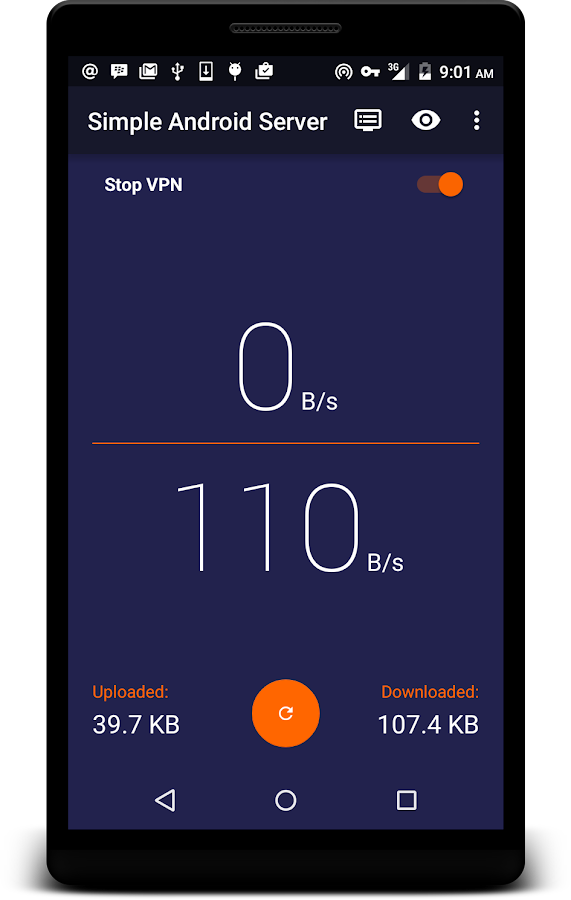
As they said SimpleAndroidServer v4 contains a Proxy Server and a Free
VPN. The VPN is not a full featured VPN. it is not provided for security
but for tunneling purposes.
Here are some New Features added to SimpleAndroidServer v4
=>VPN Is now free to use
=>Added Auto-start for Local server for premium users
=>If VPN becomes too slow over time, restart the VPN connection.
=> Added Front Query and Back Query feature
=>Fixed Sending of Configuration. Added Load Configuration Feature, Bug fixes.
=> Add host replacement feature
Here are some features that make the difference between Free VPN and Premium VPN
For Premium VPN
=>No ads for the duration of your subscription
=>Stop hourly disconnect of the VPN
=>Auto start on boot for local server
=>Up to 10 concurrent connections for VPN
For Free VPN
=>Plenty of ads available
=>Limited concurrent connections for VPN
Where To Download SimspleAndroidServer V4
Kindly visit HERE to download it from playstore
Quick Pic Gallery App With CM Cloud Storage

Many of us have lost one or a lot of memorable moments probably because our phones got bad and we had to do a factory wipe or our phones got stolen at some point.
Well, I am a victim or I was a victim until I found Quick Pic Gallery, this is no ordinary gallery app because this app comes with free cloud storage that helps you auto backup your photos on their unlimited CM Cloud drive. All you have to do is log in and get 1000gb of free online storage.
And by inviting a friend u get another 1000gb,which totals 2000gb+, this is so cool because you can get as much storage as you want just by Inviting friends to download the app.
Description:
FAST, LIGHTWEIGHT AND MODERN! QuickPic is 90% smaller than other gallery apps, but packs more power than any of them, making it the best alternative Android gallery app for all your beloved photos!
QuickPic's smooth user experience is optimized for large screens and multiple finger gestures, and contains no ads or extra permissions. Colorful themes and a modern design helps you find your pictures in a fast and fun way. View thousands of your photos instantly in a high quality slideshow, and customize the folders you wish to include and exclude for more efficient scanning.
On top of this, Quick pic CM Cloud function offers speedy back up and restoration for photos - your photos are stored on industry leading Amazon servers to help you preserve all your precious memories securely.
Download Quick Pick Gallery Here
Best Magic IP Of The Week
Plenty of Magic are now available online, after testing them all i
finally choose one of them and named it The Magic IP of The Week. In
this page i am going to list all the best Magic IP's according to my
ranking, and i will keep on updating the list by removing the week IP's
and replace them with strong one.
Before we go further let me show you the screen snap of the settings of the Best Magic IP Of The Week so that you can be able to configure yours.


Before we go further let me show you the screen snap of the settings of the Best Magic IP Of The Week so that you can be able to configure yours.


Magic IP's Ranking List
NO.1 Magic IP of The Week [104.208.247.38:3128]
| IP | 104.208.247.38 |
|---|---|
| PORT | 3128 |
| COUNTRY | USA |
| CONTIDION | MAGIC |
| HOW LONG IT TAKES TO CONNECT | 2-10MIN |
| DISCONNECTING | NO |
| Reliability | 100% |
| SPEED | VERY FAST |
Confirmed List of Modules For Marshmallow And Other Android Versions

A lot of us are starting the have the marshmallow update sent to us, well some of us upgraded manually, in general, the marshmallow update is fast becoming a thing of the past.
But thats only if we let it, I know we all rooted and also have xposed installed on our phones, which enables us to fully customise and personalise our device without really altering our software.
Of course am an Hot 2 user, fully rooted and fully xposed, and I have taken the time and pleasure to test out many of the modules that are available out there. So am gonna be dropping links of the must have modules for marshmallow, you can use the comment box to request for any module that u think caught your attention.
1. Gravity Box MM:
This is the ultimate tool that you need for that enhanced features for your hot 2 and other marshmallow devices. It enables you to tweak your:
*Status bar
*Navigation bar
*Power
*Display etc
Download GravityBox MM Here
2. MinMin Guard:
Estimates show that almost everybody hates ads, they can be really annoying, luckily this app also hates ads too and it works for android devices from 4.0+ that has xposed installed. Perfect offline adblocker.
Download MinMin Guard Here
3. Xstana (Nav. And Status Bar Module)
This is a very lovely module, sincerely I got bored of seeing those "shapes" everyday, until I stumble upon xstana,you've gotta install this module. You can also use this module if you don't have a Nav. Bar for your status bar.
Download Xstana Here
There are a whole lots of Modules out there but I really can't say much on them, so below are the list of Working, Partially working, and Not working Modules for Marshmallow devices (NB: Modules would work on other Android Versions)
Working:
1++ calculator
4G/LTE switcher 1.0
20 MP Superior Auto
ACDisplay
ActivityForceNewTask
AdBlocker
Advanced power menu+
All Notifications Expanded
Always Expandable Notifications
Always Correct
Ambient display mod
Amplify
App settings (pylers build)
AppOpsXposed
Battery Shutdown Manager
BootManager (possibly SIM bugs)
Bright Lockscreen
BubbleUPNP's Audio cast
Burnt Toast
Call Blacklist Pro
Chrome New Tab
Chrome PIE
Clarity
Clean Lockscreen (can't get rid of mic icon tho)
Cool tool
Copy toast
CrappaLinks
Custom share
Desk Clock Alarm
DisableFlagSecure
Disable Fullscreen Keyboard
Disable Instagram Double Tap
Disable Proximity Sensor (crash during 3D youtube videos)
Disable su indicator
DoubleTapToSleep
Enable ambient display xposed (beta v1.2.3)
EnhancedToast
Eye Preserver
FakeGapps
Fake wifi connection
Flat Style Bar Indicators
Flat style colored bars (updated)
Flat Style Keyboard
Flying Android
Fonter
Force Fast Scroll
Force immersive mode
G4 Tweakbox
Gmail attachment size
Gravity Box MM (official)
Greenify (use latest beta, may cause instability)
HideBatteryLowAlert
Hide Carrier Label
Hide Xposed IME
Hijri Clock
HowGiveLolli
Instagram Themer
Intelli3G
Knock Code (updated 1/17)
Lollistat (updated for MM)
LPThemer
LWInRecents
Lockscreen music art remover
Lockscreen Widgets (widget not detected by zooper)
Materialised xposed (working for some)
Maxlock (possible freezing)
Min min guard (possible freezing)
Minimum brightness
Native Clipboard
NetStrength
Network Speed Indicator
Neversleep
Nexus navbarZ
Niwatori
No Lock Home 2
No device check
Nowakelock
NotifyClean
Play Store Changelog
Powernap
Prevent running
ReceiverStop
RecentApp Clear
QuickPic2Gallery
Root cloak
Screen Filter
ScreenOffAnimation
Serajr Blurred System UI (1.1)
Smart network 2
Smooth System Progress Bars 1.5.0
Snapcolors 3.4.12
Snapprefs (new MM update)
Softkeys Fade Mod
Status Bar Download Progress (updated 1/17)
Statusbar Scroll to Top
Swipeback 2
Swype Tweaks
Trusted wifi for smart lock
Tumblr Adaway
Ultimate Dynamic NavBar Pro
Unicon beta (only on permissive)
UnrestrictedGetTasks (1/17)
Unwatch
Ussd inbox
Volume steps+ (Updated)
Volume unlinked
WhatsApp Emoji Replacer 2
WhatsApp Tuner 1.32
WiFi Key View
Xblast
Xcooldroid
XGELs
XGPM
XHangouts (updated)
Xinsta (working with new version)
XKindleMod
XLDrawer
XLed
Xnotifications
Xorware 2G/3G/4G Switcher
Xorware All in One Widgets
Xposed Additions (updated)
Xposed GEL Settings (beta)
Xposed torch (updated 12/29)
Xprivacy
Xstana
XuiMod
XXSID Indicator
YouTube adaway
Zoom for instagram
Partially working:
Awesome popup player (working for some)
Boot manager (working for some)
DirectApkInstall (installs apk but it package installer doesn't appear)
Gesture Navigation
Lockscreen Disabler (ambient display broken)
Moto Checkbox
Native Freezer
Physical Button Music Control
Restore notification ticker on Lollipop (Prevents heads up from working, but doesn't show ticker text)
TabletMetrics
Wanam kit
XBridge
XInternalSD
XTether
XToast (working for some)
Xinstaller (bootloops for some people)
Not Working:
Audio BT
Audio balance
Audio stream music default
Complete Action Plus (no effect)
Dont Swipe
DynamicAlarmIcon
Exchange Security Bypass
Exchange User Agent Fake (1/17)
HandleExtStorage (1/17)
Hideable Nav Bar
iFont
IMEI Changer
Insert Custom Text (installs but no effect)
Lock screen clock mods [LP]
MagnetOff
Mobile radio active fix
Native Clipboard (non functioning)
Native Freezer
PBCM
PinNotif
PlayPermissionsExposed
Playstore link in App info
ScreenshotDelayRemover (no effect)
Shortcut in app info
SIM Number Changer
SwipeUpToSleep (no effect)
Tinted Recent Panels
True Silent Mode
Vibration tuner
Wifi Filter
Wifi Key View (does nothing)
XBatterythemer
Xclip 2.0
Xtended Nav Bar (does not control music)
Xposed Gesture Navigation (installs but no function)
In general, power and audio related modules are not working.
Place your comments if you have questions or requests for Modules links.
Doogee X6: The Cheapest Beautiful Android Smart Phone For You
Are you looking for a cheapest and beautiful android smart phone than will cover 90% of your needs?You can go for Doogee X6.

DOOGEE X6 Smartphone use MTK6580 Quad Core CPU, 1GB RAM + 8GB ROM with 5.5 Inch 1280*720 HD screen, Android 5.1 OS, promises quite a fast operation speed is quite amazing and impressive.


It has 2.0MP front camera interpolation to 5.0MP for convenient self-capturing, 8.0MP back camera for you to record every single moment clearly.
Doogee X6 has 3G network, GPS, WiFi, Bluetooth, and 3000mAH battery capacity etc.
With all the fantastic features mention above Doogee X6 has a cheapest
price so that everybody can have it, Only US $69.99 and is available in
Aliexpress
Friday, 29 January 2016
Airtel Blackberry Unlimited, Absolute and Complete plans for BB10
This post contains all the Airtel Blackberry plans for BB10 users on the Airtel Network in Nigeria. You will find all the various airtel blackberry plans for BB10 users which includes Airtel blackberry Monthly, weekly and daily plans. See the full details of the subscription codes and price list below.

BB10 MONTHLY PLANS
Lite - 250 MB - 1000 Naira - *440*13#
Midi - 500 MB - 1500 Naira - *440*10#
Max - 1.5GB - 3000 Naira - *440*7#
BB10 WEEKLY PLANS
Lite - 80 MB - 350 Naira - *440*14#
Midi - 130MB - 525 Naira - *440*11#
Max - 350MB - 1050 Naira - *440*8#
BB10 DAILY PLANS
Lite - 10MB - 70 Naira - *440*15#
Midi - 15MB - 100 Naira - *440*12#
Max - 50MB - 200 Naira - *440*9#
NB: Get up to 30% discount on any smartphone of your choice. Click here for Price list This post contains all the Airtel Blackberry plans for BB10 users on the Airtel Network in Nigeria. You will find all the various airtel blackberry plans for BB10 users which includes Airtel blackberry Monthly, weekly and daily plans. See the full details of the subscription codes and price list below.
BB10 MONTHLY PLANS
Lite - 250 MB - 1000 Naira - *440*13#
Midi - 500 MB - 1500 Naira - *440*10#
Max - 1.5GB - 3000 Naira - *440*7#
BB10 WEEKLY PLANS
Lite - 80 MB - 350 Naira - *440*14#
Midi - 130MB - 525 Naira - *440*11#
Max - 350MB - 1050 Naira - *440*8#
BB10 DAILY PLANS
Lite - 10MB - 70 Naira - *440*15#
Midi - 15MB - 100 Naira - *440*12#
Max - 50MB - 200 Naira - *440*9#
SUBSCRIPTION CODES OF THE AIRTEL BLACKBERRY MONTHLY, WEEKLY AND DAILY PLANS FOR BB10 USERS

BB10 MONTHLY PLANS
Lite - 250 MB - 1000 Naira - *440*13#
Midi - 500 MB - 1500 Naira - *440*10#
Max - 1.5GB - 3000 Naira - *440*7#
BB10 WEEKLY PLANS
Lite - 80 MB - 350 Naira - *440*14#
Midi - 130MB - 525 Naira - *440*11#
Max - 350MB - 1050 Naira - *440*8#
BB10 DAILY PLANS
Lite - 10MB - 70 Naira - *440*15#
Midi - 15MB - 100 Naira - *440*12#
Max - 50MB - 200 Naira - *440*9#
HOW TO CHECK YOUR DATA BALANCE
To check the data balance of your Airtel BB10 plan, simply dial *123*9# or text status to 440NB: Get up to 30% discount on any smartphone of your choice. Click here for Price list This post contains all the Airtel Blackberry plans for BB10 users on the Airtel Network in Nigeria. You will find all the various airtel blackberry plans for BB10 users which includes Airtel blackberry Monthly, weekly and daily plans. See the full details of the subscription codes and price list below.
SUBSCRIPTION CODES OF THE AIRTEL BLACKBERRY MONTHLY, WEEKLY AND DAILY PLANS FOR BB10 USERS
BB10 MONTHLY PLANS
Lite - 250 MB - 1000 Naira - *440*13#
Midi - 500 MB - 1500 Naira - *440*10#
Max - 1.5GB - 3000 Naira - *440*7#
BB10 WEEKLY PLANS
Lite - 80 MB - 350 Naira - *440*14#
Midi - 130MB - 525 Naira - *440*11#
Max - 350MB - 1050 Naira - *440*8#
BB10 DAILY PLANS
Lite - 10MB - 70 Naira - *440*15#
Midi - 15MB - 100 Naira - *440*12#
Max - 50MB - 200 Naira - *440*9#
HOW TO CHECK YOUR DATA BALANCE
To check the data balance of your Airtel BB10 plan, simply dial *123*9# or text status to 440 - See more at: http://www.inforisticblog.com/2016/01/airtel-blackberry-unlimited-absolute.html#sthash.PnOARARM.dpufLearn How To Make Any Android Keyboard Transparent
Here is a quick tip and DIY to easily make your android keyboard transparent for any application that makes use of the keyboard. This tip should be for fun for those who would need it and would be achieved by the use of an app in the play store.

1. Head over to Google Playstore and search for Hackers Keyboard
2. Just select then install the App.
3. Open your Hackers keyboard then select and tap “Input Methods” then mark Hackers keyboard and tap the settings icon.
4. After selecting settings, choose “Theme and Label settings” then tap Keyboard Themeand select “Transparent Experimental“.
5. You can also play around the interface and modify other options you like. You can then try it by opening an app that could trigger the android keyboard like Whatsapp or any Chat app.
6. Drop down or expand the notification panel and select “Choose Input Method” select “Hacker’s Keyboard. Boom! Your Android’s keyboard is now transparent.
Having difficulties? Simply use the comment section.
All Mtn Bis Settings For Psiphon Handler

Mtn Bis Subscription Codes
1. For Daily sub dial *216*3*1# @ N702. For Weekly sub dial *216*3*2# @ N350
3. For Monthly sub dial *216*3*3# @ N1000
Psiphon Settings
There are different psiphon settings for Mtn Bis. A friend of mine shared it to me on Whatsapp and I tested all the settings and they were working perfectly.use your default phone settings
The More option in Psiphon settings is contant i.e where the Host address and port i.e 10.199.212.2 and8080 is as shown in the pic below

It would be more of pics and less writing
1. Psiphon settings for Mtn Bis Bblite


4. Psiphon settings for Mtn Bis Bblite


5. Psiphon settings for Mtn Bis Bblite


I am currently using the 5th settings. If you are having any issue with any of the settings, switch another settings. Confirmed and working flawlessly.
6. Psiphon settings for Mtn Bis Bblite (New)

7. Mtn Bblite Bis Settings (New)

Made this post for people having problems using their bblite subscription on Android.
Note: It's capped 5gb
If you have any problem, you can drop it in the comment box
Subscribe to:
Comments (Atom)